Paper Knife APK Download Latest
How to install Paper Knife APK Download Latest v1.0.9 APK?
1. Tap the downloaded Paper Knife APK Download Latest v1.0.9 APK file.
2. Touch install.
3. Follow the steps on the screen.
Description
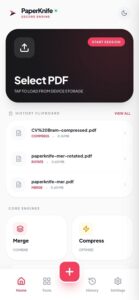
Paper Knife APK is a privacy-focused PDF editing tool designed for students, professionals, and anyone who wants to manage documents on Android securely. The Android version is provided as an APK file and can be installed manually.
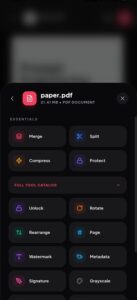
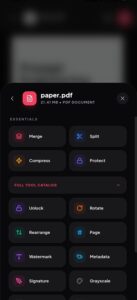
You can merge multiple PDFs, split, rotate, and reorder pages, and compress large files to save disk space. You can also convert PDFs to images or text, add or remove passwords, and extract hidden metadata, such as author information.
What is Paper Knife APK?
Paper Knife APP APK is an Android app specifically designed for editing PDF documents. It’s not a game or an origami app (though there are APKs with similar names available online). It’s a professional tool for manipulating PDFs.
Paper Knife’s goal is simple: keep your documents private and give you complete control. All processing occurs locally on your phone or browser. This means documents like bank statements, contracts, ID cards, and school certificates remain stored on your device.
Paper Knife APK Highlights
PDF Editing and Organizing: Merge multiple PDFs into a single document. Split PDFs into individual pages or sections.
Compression and Optimization: Reduce the size of large PDFs for easier sharing and storage.
Security Features: Password-protect or encrypt PDFs. Remove passwords from documents with permission.
Conversion Features: Convert PDFs to images (JPG/PNG) or plain text. Convert images to PDF.
Signature and Anonymization: Add digital signatures to PDFs offline. Protect your privacy by removing hidden metadata, such as author information.
Benefits And Losses of Paper Knife APK
Benefits:
- Full-featured for offline and private editing.
- Lightweight and efficient APK file. Open source.
- No ads or hidden analysis tools.
- Extensive PDF editing tools.
Losses:
- Requires manual installation.
- Not available by default in regular app stores.
- Advanced annotation features may be limited compared to paid editors.
Helpful Tips For Beginners
- Make a copy of your original PDFs before merging or compressing them.
- When encrypting, choose a strong, easy-to-remember password.
- Remove metadata when sharing sensitive files.
- Compressing and decompressing large documents takes longer.
Frequently Asked Questions (FAQs)
Q: Is Paper Knife APP free?
A: Yes, this is completely free. No subscriptions, in-app purchases, or premium features are required.
Q: Does it work offline?
A: Yes, all features in Paper Knife work completely offline. No internet connection is required to edit and manage PDFs.
Q: Can I sign documents with Paper Knife?
A: Yes. The built-in signature tool allows you to add a digital signature without printing or scanning.
Q: Can I merge multiple PDFs with this App?
A: Of course. This app allows you to combine multiple PDFs into a single, organized file using a simple interface.
Conclusion
Paper Knife APP APK stands out for focusing on the essentials rather than trying to do everything at once. While many apps prioritize complexity, this demonstrates the power of focus. Its optimized design, high performance, simple interface, and ease of use make it an ideal choice for users who value maximum efficiency.
Images